FAQ

General

Q.  I live outside of North America. Can I still use this service?

Absolutely! Because our system is web-based, it does not matter if you're from New York or New Delhi, Tampa or Tokyo, London or Los Angeles. The time it takes you to set up your website and manage it from wherever you are in the world is completely the same.

All Top Producer® Websites features are available worldwide as long as you have an Internet connection.

Q.  Do I need to know HTML or any other programming language to use Top Producer® Websites?

We've done all the work for you. Our system is developed specifically for non-technical people so you never have to worry about deciphering code or fumbling with development tools.

Q.  How important is graphical design?

Extremely. We live in a world where first impressions are very important. The bottom line is that you need to inspire confidence, engage your viewer and give them a sense of your competence.

With our award-winning design team, Top Producer® Websites knows exactly what it takes to design your professional online presence so that you always look great.

Q.  How do I know how many visitors have been to my website?

Top Producer® Websites provides you with reporting tools that give you an overview and details about your site's most popular pages and listings.

Q.  Will my customers find my website using search engines such as Google" and Yahoo!®?

Yes. We submit your site to the major search engines automatically, along with your description and your keywords. For tips on how to optimize your website for search engines, see "Search Engine Optimization".

Q.  What is search engine optimization?

Search engine optimization is the act of making a website come up higher in search results. For tips on how to optimize your website for search engines, see "Search Engine Optimization".

Q.  If I don't have time to call, are there any other alternatives to receive support?

Yes, you can email our website Consultants at [email protected].

Getting Started

Q.  How do I add my photo and logo to my website?

To add your photo to your website, see "Adding Your Photograph". To add your logo to your site, see "Adding Your Logo". If you have a Top Producer® account, you can import your personal profile and listings into Top Producer® Websites. For more information, see "Importing Your Profile from Top Producer".

Q.  Can I select the content of the pages on my website?

Yes. You can create new pages and modify their content.

Q.  Can I add new pages to my website?

Yes. You can add as many web pages as you want.

Q.  Can I change my URL?

Yes. Contact Support to change your URL.

Q.  Can I use the pages that I create with Top Producer® Websites on a different website?

No. While the content and any other items you upload are yours, the website and design will not run on any other server or host provider. Top Producer® Websites is proprietary to Top Producer®.

Q.  Can I have an IDX search page on my website?

Yes. You can add an IDX search page to your website. For more information, see "Adding an IDX Page" in the Online Help.

Q.  Can I link this new website to my current site?

Yes! One of the things about getting a new website, like a new email address, phone number or office address, is that you have to let customers know where to find you.

Q.  When I enter in my login information for Top Producer integration, I receive an error message.

Passwords in Top Producer® are not case sensitive; however, they are case sensitive in Top Producer® Websites. When integrating with Top Producer, ensure that your password is case sensitive.

Themes

Q.  I don't like any of the themes. What should I do?

Our themes have been designed by our graphic artists to ensure that your website looks great and professional. If you have an image that you want to use as the banner for your website, you can create your own customized theme. For more information, see "Creating a Custom Theme".

Q.  Can I change my theme after I select one?

With a simple click of a button, you can change your theme. This is especially useful considering a Web sites life is usually 2 to 3 years.

Instead of beginning the process all over again, you simply select a new theme (were constantly adding new ones) that suits you. The process is quick and simple. For more information, see "Changing Your Theme".

Q.  I thought I was supposed to be able to select different color variations for a theme but not all of them seem to have a color variation that I can choose from.

Most themes will have a color variation from which you can choose. We are working on offering this color variation for all our themes.

Pricing

Q.  How much will a domain cost me?

$20/domain per year

Q.  Is there any additional fee when I make changes to my website?

No. You can modify your website as often as you would like.

Q.  When is my billing date?

If you are a Top Producer® subscriber, the billing date for Top Producer® Websites is the same as your Top Producer® billing date with the first month prorated.

If you are not a Top Producer® subscriber, your billing date is set based on the initial purchase date.

Q.  What happens after my one-year subscription expires?

After one year, you can renew it on a month to month basis. You'll receive a 5% discount if you prepay for 1 year, 7.5% for 2 years and 10% for three years.

Web Pages

Q.  How do I use Outlook to send a listing link to my customers?

  1. Click View Site.

  2. Navigate to the listing page that contains the listing that you want to send.

  3. Click on the listing.

  4. Select the entire address in the Address box and press CTRL + C.

  5. Open Microsoft® Outlook® and click New to create a new email.

  6. Type the message that you want to send to your customers.

  7. Place your cursor where you want the listing link to appear, press CTRL + V and then press Enter.

  8. Outlook inserts the address to this link and changes it into a hyperlink. You can now send this email to your customers.

Q.  I accidentally closed my Web browser while creating/editing a web page and lost all the changes. Why did Top Producer® Websites not prompt me to save my information?

Due to technical limitations, Top Producer® Websites is unable to prompt you to save your page when you close the browser. We recommend that you click 'OK' to save your work before closing the browser.

Q.  Why can't I see my web pages on my site?

Your web pages are probably marked as 'Hide from Menu'. This page is available to your visitors. However, it cannot be accessed from the navigation menu. For more information, see "Hiding a Web Page".

Q.  How do I work on more than one Top Producer® Websitessite at the same time?

If you logged in to more than one Top Producer® Websites account and wish to edit their corresponding Web sites at the same time, you need to modify your browser settings to avoid any unexpected results.

Note: Follow these steps only if you are using Internet Explorer. If you are using Firefox, no changes are required.  

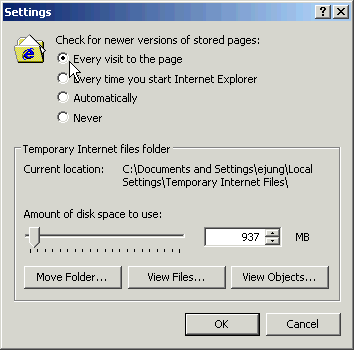
To disable page caching in Internet Explorer:

  1. On the Tools menu, click Options.

  2. On the General tab, under the Temporary Internet Files section, click Settings.

  3. Under the Check for newer versions section, select the Every visit to the page option.

  4. Click OK on the windows to close them and apply the changes.
Q.  Why are my web pages sometimes not displayed properly? For example, the font size may appear too large.

There may be a problem with your browser's cache. Try the following:

Q.  How do I create lead forms?

See "Creating a Lead Form".

Q.  Why is it that when I'm trying to edit my website, none of the buttons work?

Your Norton anti-virus is probably blocking the application. To grant access to Top Producer® Websites, follow these steps:

  1. Open Norton Internet Security/Norton Firewall.

  2. Select Privacy Control > Configure.

  3. From the Privacy Control screen, click Advanced.

  4. Click Add Site and add www.topproducerwebsite.com.

  5. Click the User Settings tab.

  6. Under Pop-up ads, clear the Use Ad Blocking check box and select Permit.

  7. Click OK.

  8. Close all IE or Firefox windows and then log on to TWS again.

Q.  When viewing my Top Producer® Websites, I'm only able to see html code with no pictures.

This is likely due to parental software that is blocking the content. You will need to set Top Producer® Websites to allow (and not block) within the parental control software. Consult your parental control software documentation for instructions on how to do this.

Web Boxes

Q.  What are web boxes?

Web boxes contain short text, quick links, local weather or any information that you wish to include in a web page. You can include the following information in a web box:

Q.  How do I add a web box to a web page?

See "Adding a Web Box to a Page"

Listings

Q.  Why should I integrate with Top Producer®?

If you integrate with Top Producer®, you can import your listings that are active, sold or have a pending sale directly from Top Producer®. For more information, see "Importing Top Producer Listings".

You will also be able to import your profile details, such as your credentials and photos. For more information, see "Importing Your Profile from Top Producer".

Q.  How do I display my REALTOR.com® listings?

See "Displaying Realtor.com Listings".

Q.  How do I add photos to my listings?

See "Adding a Listing Photo".

Q.  When I try to import listings from Top Producer, I get an error message that the username and password does not match

This error will occur if you are synchronizing or converting data. You will need to wait until that process is done or cancel the process before you are able to import listings. It is recommended to wait for the process to finish.

Q.  When I click on Import listings, the screen flashes and then nothing happens.

Your Norton antivirus is probably blocking the Import Listing popup. To resolve this, follow these steps:

  1. Open Norton Internet Security

  2. Select Privacy Control > Configure.

  3. Click Add site and add type topproducerwebsite.com (the www. is added automatically)

  4. Select topproducerwebsite.com from the list and click the User Settings tab

  5. Under Popup Ads clear the Use ad block settings check box and select Permit.

Domain and Email Addresses

Q.  I just changed my domain so that it is hosted by someone different. Why can't I access my website?

With any domain change/purchase, it can take up to 72 hours to fully propagate to all lookup servers and be available from all locations. Typically, these changes will be available immediately but some locations will experience delays.

Q.  I currently have my domain registered with another company. Can I use this for my Top Producer® Website?

Absolutely! All you need to do is have your registrar redirect your domain name to our servers. Since we do not own your domain name, we can't legally do this for you. For detailed instructions, see "Adding Your Existing Domain Name". If you need any assistance, contact our Website Consultants.

Q.  How do I register a domain name through Top Producer® Websites?

Contact us and we will help you register for a domain.

Q.  Do domains managed with Top Producer® Websites support special requests? (i.e., URL Redirecting, MX Records, CNAME Records, etc...)

Contact us and we will help you register for a domain.

Q.  What happens to my domain name if I cancel my Top Producer® Websites account?

Since you purchased the domain name, you will own it even though you're canceling Top Producer® Website. At this point, you would have to transfer the domain to an account with another registrar. There are a couple of things that you need to be aware of:

 Whichever the case, please contact your Website Consultant for assistance with the transfer.

Q.  I have email hosted on my own servers. Is it possible to use these email servers with my domain name?

Yes, this is possible through "MX Records." If you're not sure what your mail server MX Records are, you may need to contact the company responsible for hosting your email servers. To add these records, follow these steps:

  1. Log on to Top Producer® Website.

  2. Click on Manage Domain Names/Email Addresses.

  3. Assuming you have already added your domain name, select Use Another Company.

  4. Enter your MX Records in the Primary/Secondary mail server fields.

  5. Click Done.

Q.  I added an RSS (Really Simple Syndication) feed to my TWS site but when I click on the 4th or 5th feed, it asks me for a username or password. Why does that happen?

Some RSS feeds/sources will require a username or password when accessing more than 3 feeds. To have more than 3 feeds display without requiring a password, you would have to sign up for the service. Alternatively, you can choose to only display 3 links for the RSS feed.